A WordPress booking system for tour operators has to handle things a salon booking plugin never thinks about: trip capacities instead of time slots, departures that fill up, staff who need to override the rules, payments, calendar sync, and reminders with trip details sent before departure. Generic plugins can be bent toward that, but the cleanest answer is usually a booking system built around how the trips actually run.
I built one for Thailand Mountain Trail, a trekking and trail running company in northern Thailand. Here is what a tour booking system needs and how theirs works.
Why generic booking plugins struggle with tours
Most WordPress booking plugins are built for appointments: one customer, one staff member, one slot. Tours work differently:
- Capacity, not slots. A trek has a group size limit. Ten people can book the same departure, and the eleventh should not.
- Multi-day trips. A three-day run starts on one date and ends on another, and the whole trip is the product.
- Statuses beyond booked and cancelled. Trips get held, confirmed, moved and completed.
- Staff overrides. The office needs to add a private group, bend a capacity rule, or enter a booking taken by phone.
- Information that has to go out. Meeting points, packing lists and departure details, at the right time before the trip.
Thailand Mountain Trail had tried to do all of that with off-the-shelf tools. Rebuilding it from parts meant Gravity Forms, Gravity Flow and paid add-ons, at $800 or more a year, and the calendar still was not included. Even combined, that stack could not do the job.
The booking flow, step by step
The system I built moves every booking through the same five steps, with no manual work in between:
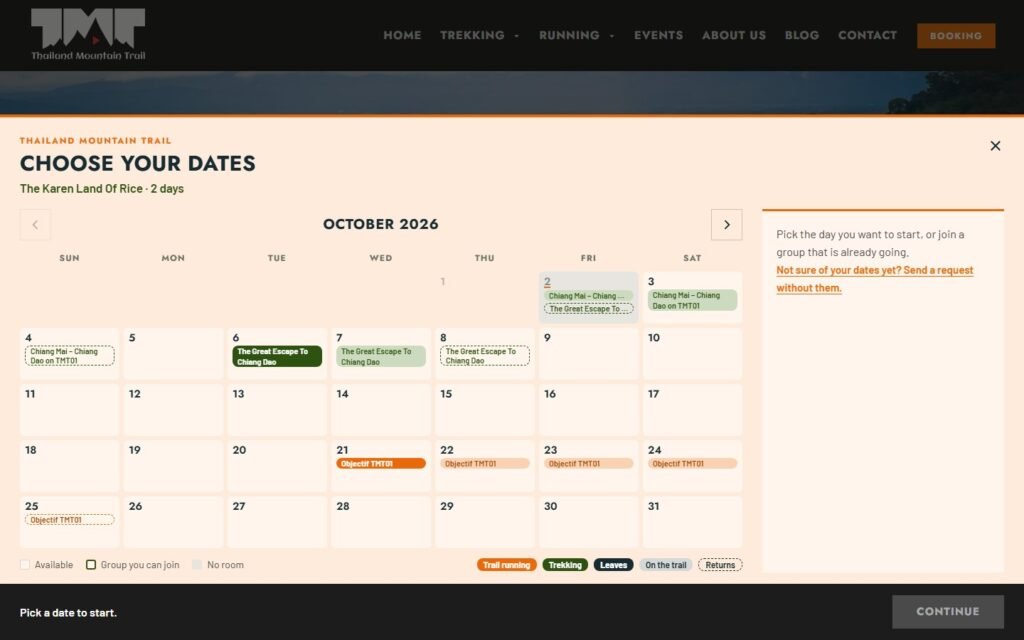
- Date picked. The customer chooses a departure on a calendar that only shows dates the trip runs.
- Capacity checked. The system confirms there is room for their group before they pay.
- Paid through WooCommerce. Checkout runs on WooCommerce, so payments, receipts and refunds use tools the business already trusts.
- Synced to Google Calendar. Confirmed bookings land on the team’s calendar automatically through the Google Calendar API.
- Reminders and a trip PDF sent. The customer gets reminders and their departure details as a PDF, on schedule.
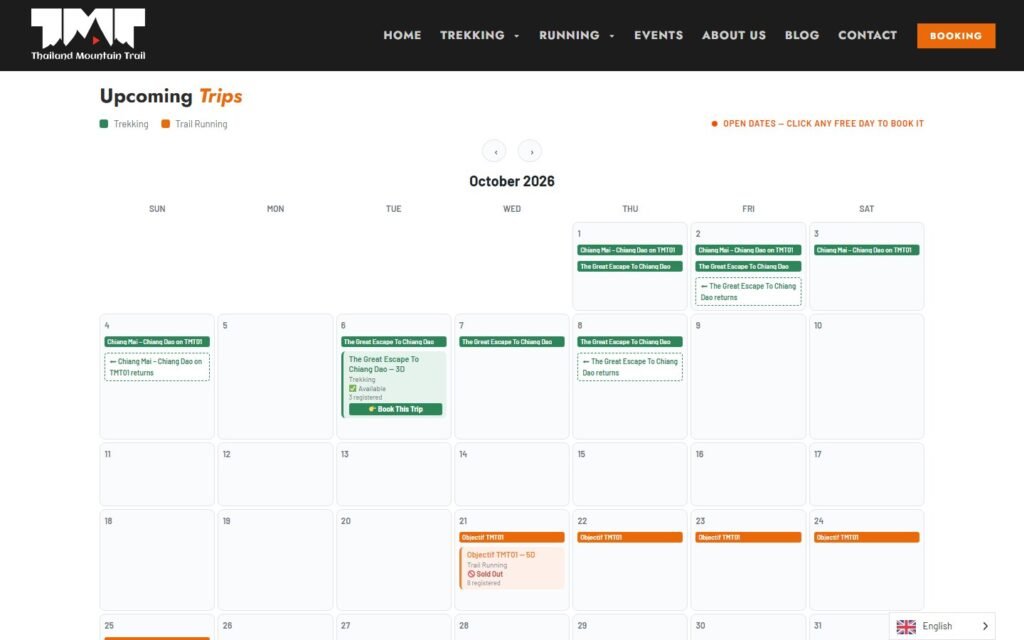
Customers also see every departure on a public trip calendar, with how many people have registered and a clear Sold Out once a trip is full.
Statuses that match real trips
Instead of a fixed pending, confirmed and cancelled, the system has a status pipeline built around how the office works: active bookings, bookings on hold while details are sorted out, and past trips. Each status can trigger its own emails, and the booking list is grouped by status so staff see what needs attention first.
A staff calendar and manual overrides
Rules are good until the phone rings. The office has dedicated screens to enter bookings by hand, adjust a departure’s capacity, bypass a rule for a private group and generate a trip PDF on the spot. Staff see every departure on a staff calendar, separate from the public one customers book from.
Built as Elementor widgets
The customer calendar, the staff calendar and the lead capture form are Elementor widgets. The team drags them onto any page and styles them in the Elementor panel, with no shortcodes to remember and nothing hard-coded. That matters because the team edits their own site, and booking tools should be as easy to place as a heading. I cover how I set that up in Elementor website design your team can edit.
Two plugins instead of one
The system is split into two plugins that work together: one for the booking core and one for the calendar and sync. Keeping them separate keeps each one small, easier to test and safer to update. Bookings and their details live in the plugin’s own database tables, not in WordPress posts, so the booking list stays fast as the seasons pile up. I explain that choice in custom post types vs custom tables.
What the business got
- No license fees. The custom system replaced a stack of paid plugins and add-ons, and the business owns it outright.
- Hours back every week. Staff entries are digital and every transactional email and trip PDF goes out on its own.
- A system that fits. The software follows how trips run, instead of the business bending around software built for haircuts.
The full story, including the security mess I found on their old site, is in the Thailand Mountain Trail case study.
Should your tour company build or buy?
If you run a few simple day tours with no capacity rules, a well-reviewed booking plugin may be all you need. If you run multi-day trips, group departures, staff overrides or anything that has you keeping a spreadsheet next to your booking plugin, a custom build is worth pricing. My posts on custom plugin or off the shelf and what a custom plugin costs will help you decide.
Frequently asked questions
Can a WordPress booking system take payments for tours?
Yes. Running checkout through WooCommerce gives you its payment gateways, receipts and refunds, while the booking system handles dates, capacity and trip details.
Can bookings sync with Google Calendar?
Yes. Confirmed bookings can be pushed to a Google Calendar automatically, so the team sees every departure without copying anything by hand.
Can staff add bookings taken over the phone?
They should be able to. A good tour booking system includes manual entry screens and overrides for capacity and rules, because real offices take bookings in more than one way.