A good website redesign checklist protects what already works before it changes anything. Record which pages bring traffic and leads, map every old address to its new one, carry over titles and descriptions, set up redirects before launch, test every form, and watch Search Console closely for a few weeks afterward. Skip those steps and a better-looking site can lose the rankings and leads the old one earned.
This is the checklist I run on every redesign, from a roofer’s five-page site to a car shipping company with 75+ landing pages.
Before you design anything
Find out what the current site is doing right
- Top pages by traffic from your analytics, for the last 12 months.
- Top pages by search clicks from Google Search Console, and the queries behind them.
- Where leads come from: which forms, which pages, which phone number.
- Pages other sites link to. Those links carry weight you do not want to throw away.
Some ugly pages are quietly bringing in most of the business. A redesign that deletes them because they look old is how companies lose half their leads overnight.
List every URL
Crawl the current site and export every address: pages, posts, products, categories and PDFs. This becomes the redirect map later. Do not trust the menu to show you everything.
Write down what is broken
Slow pages, missing service information, forms that let spam through, leads that never reach the CRM. Secure Auto Shipping’s list was long: page after page of paragraphs, a high bounce rate and quote requests that did not always make it into their CRM. The redesign was the chance to fix all of it. The full story is in the Secure Auto Shipping case study.
While you build
Plan the structure around what people search for
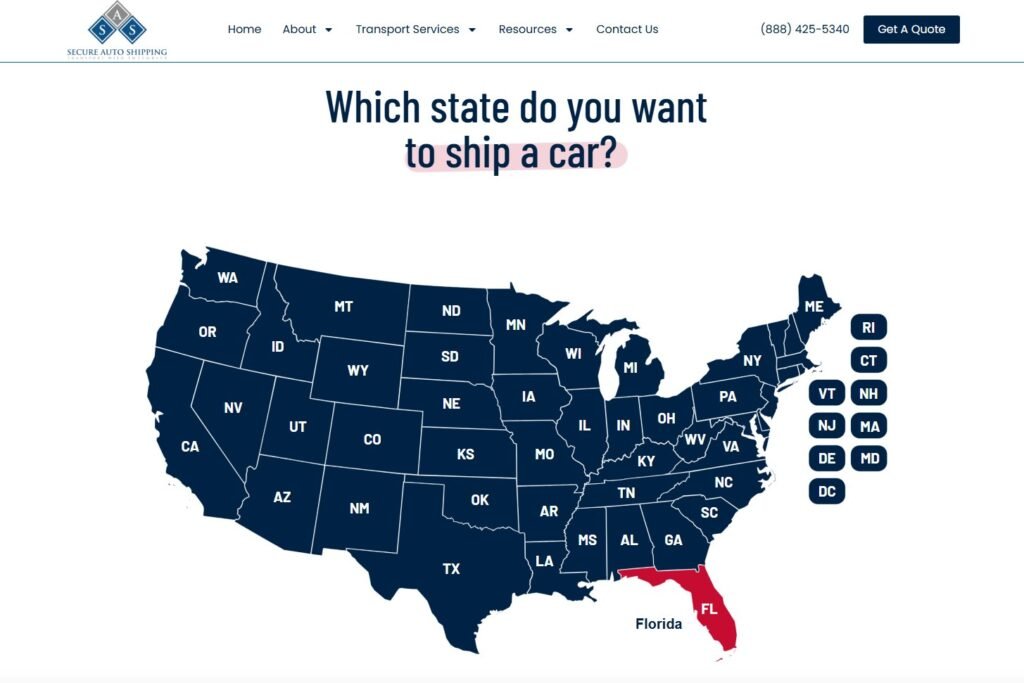
A redesign is the best time to fix structure. Give every service its own page. Give every area you serve real content, not a copy with the town name swapped. Secure Auto Shipping went from a handful of long pages to 75+ state and niche landing pages, each with one job, plus a clickable state map that sends visitors to their state’s page.
Keep URLs where you can
If an old address still makes sense, keep it. Every URL you keep is a redirect you do not need and a ranking you do not risk.
Carry over titles and descriptions, then improve them
Pages that rank well should keep their topic and main phrase. Improve the wording, but do not turn a page about “car shipping to Florida” into a page about “our story.”
Build on a staging site and hide it from search
Work on a copy of the site that search engines cannot index. Then write a big note to yourself to undo that at launch, which brings me to the most common redesign mistake I see: a new site that launches still telling Google not to index it.
Design for phones first
Most local service traffic is on a phone. Test the call button, the quote form and the menu on a real phone, not only in a desktop browser’s narrow window.
Launch day
- Put the 301 redirects live. Every old URL that changed should point to its closest new page with a permanent redirect. Google’s guide to site moves with URL changes is worth reading in full, and its page on redirects explains which kind to use.
- Turn indexing back on. Check the site’s search engine visibility setting and robots.txt.
- Submit the new sitemap in Google Search Console.
- Test every form and every phone link, and confirm the leads arrive where they should.
- Check analytics and tracking are firing on the new pages.
- Run the key pages through PageSpeed Insights on mobile. My Core Web Vitals fix list covers what to do with the results.
The first month after launch
- Watch the 404 report and redirect any old address people or search engines still hit.
- Watch Search Console for pages dropping out of the index and queries losing clicks.
- Compare leads week by week against the same period before launch.
- Fix fast. Most redesign problems are small if you catch them in the first two weeks.
A small dip in traffic for a few weeks after a big change is normal while search engines process it. A drop that keeps going means something was missed, usually redirects or indexing.
What a redesign can do when it is done right
Three Rivers Roofing had a site with a few paragraphs and a contact button. After a redesign with service pages, a lead capture page, spam-proof forms and True SEO built in, organic leads went from 2 or 3 a month to 1 to 3 a day. I break down what made the difference in roofing website design that turns visitors into calls.
If you are moving to Elementor as part of the redesign, read how I build Elementor sites your team can edit too.
Frequently asked questions
Will a website redesign hurt my SEO?
It can, if pages disappear, URLs change without redirects or content gets thinner. Done with a redirect map, carried-over content and a careful launch, a redesign usually improves SEO.
How long does a website redesign take?
A small business site often takes a few weeks. Larger sites with dozens of landing pages, custom features or integrations take longer. The audit and planning at the start save time later.
Should I keep my old URLs?
Keep any that still make sense. Change the rest only when the new structure is clearly better, and redirect every changed URL to its closest new page.